English (UK)
  Dansk (DK)
Video on how to create CutContour
Create your file based on the following, and we can guarantee the print:
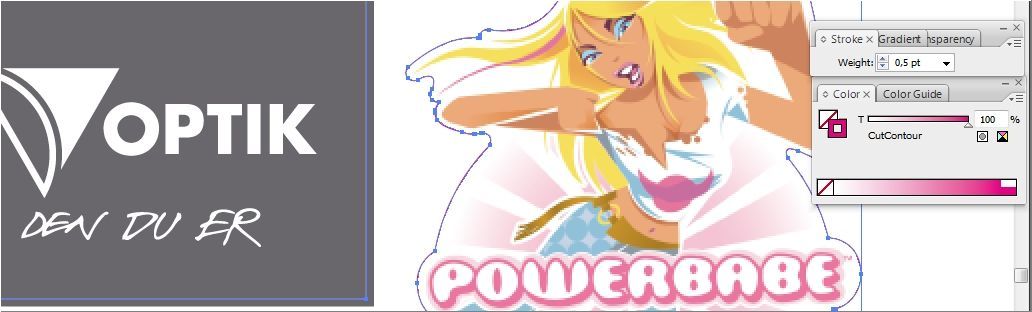
- The cutting line must be a Spot color, 0.5 points thick, and named exactly "CutContour" (without quotes)
Download a Swatch for Illustrator, Indesign, Coreldraw, Quark, Freehand, and PageMaker" click here
Copy the swatch into the Swatches library under the program. For example, C:\Program Files (x86)\Adobe\Adobe Illustrator\Presets\Swatches
See more about the cutting line at the bottom of the page - 2-3 mm bleed/extra background beyond the cutting line
- Color: CMYK
- Color profile: Euroscale coated (v2)/Fogra27
- Black is specified as C=0% - M=0% - Y=0% - K=100%
- Images minimum 150 dpi
- Fonts should be outlined
- File size = 100% / 1:1
Go to the product Stickers click here
Here you can download a print file made correctly. Click on the image.


If you are unable to create a correct file, you can simply send, for example, an image (jpg or similar), and we will add the cutting line. This does not apply to special cuts like Powerbabe.
If you are unable to create a correct file, you can simply send, for example, an image (jpg or similar), and we will add the cutting line. This does not apply to special cuts like Powerbabe.
We prefer to receive PDF files. If this is not possible, jpg or tiff files can also be accepted, but no guarantee is made for correct colors or quality.
Create your own PDF files from all your Windows programs. Two options, both free and very easy to use:
- Download and learn more at www.gonitro.com/primopdf
They are used as a printer. You click print and select, for example, CutePDF as the printer, and it will create a PDF file.
How to create the cutting line in Illustrator